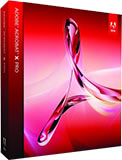
Acrobat 9 Training Course
We offer a 2-day introductory and a 2-day advanced training
course in Acrobat.
We currently offer public Acrobat training courses in many cities around the country. Please click on the schedule link to your right to see a complete list of our Acrobat courses.
You can register for these courses by clicking on the link at the top of this page or by clicking on the register link next to the scheduled dates on the right.
We also offer custom Acrobat
training courses and consulting which can be tailored and targeted
specifically to you and your staff. These courses can be held
at many training centers or on-site at your location
anywhere in the USA. We also provide Acrobat live online training courses in a virtual classroom. Our Acrobat training and
support team have over 10 years experience developing and teaching Adobe applications.
Please contact training@americanmediatraining.com if
you would like more information on our Acrobat custom training courses.
|
||||||||||||||||||||||||||||||||||||||||||||||||||||||||||||||||||||||||||||||||||||||||||||||||||||

Description
Adobe Acrobat 9 Professional is the worldwide industry standard tool for problem-free digital document proofing and for computer to plate solutions.
Acrobat is also widely used for integrating documents into websites and content re-purposing. This introductory course is for those using Acrobat in a print, design or publishing capacity who need a comprehensive and practical understanding of Acrobat.
Adobe Acrobat Level 1 Course outline
Introduction to Acrobat
Understanding PDF files - their form and function
The Acrobat environment
The Getting Started window
Navigating round a PDF
Copying and pasting text and graphics
Using the Search features
Customising your toolbars
Acrobat features
Creating a blank PDF page
Using the Insert, Extract, Delete and Replace commands
Setting Open options
Full screen mode
Adding bookmarks and links
Creating bookmarks
Editing bookmarks
Adding document links
Creating enhanced bookmarks and links
Using thumbnail images
Using Acrobat for proofing
Using the pencil and line tools
Attaching notes to documents
Attaching files to documents
Text annotation features
Highlighting tools
Changing comment authors
Using the comment management tools
Exporting and importing comments as FDF files
Understanding Distiller
Creating different types of PDFs using Distiller
Distiller PDF settings (job options)
Creating ultra-compact PDFs
Bitmap resolution and compression explained
Embedding fonts
Color management issues
Using Distiller correctly
Using Watched folders
Creating PDFs from Adobe InDesign and/or QuarkXPress
Creating PDFs from Illustrator or Photoshop
Hints and tips
Questions and answers
This course is designed for anyone who will use a computer and Acrobat 9 Standard or Professional to work with PDF files
Improve the way in which you create, combine, distribute and share Adobe PDF documents with this highly acclaimed introduction course.
You should have the following experience prior to taking this course:
Upon successful completion of this course, students will be able to:
Description
This course is designed to give those who already have experience of working with Acrobat (version 8 or earlier) the skills to explore and exploit the potential of this increasingly business critical application.
This is a two day Adobe authorized practical course which will include a detailed exploration of Acrobat Distiller options and settings, advanced navigation and color management issues, advanced editing and commenting features and document security issues. The course will also include an overview of accessibility issues, creating online forms using Acrobat, using web capture and Acrobat Catalogue.
We also recommend this course for anyone considering taking the Adobe Certified Expert exam. If you wish to create a tailored version of this course built around your exact requirements, please give us a call or email.
Adobe Acrobat Level 2 Course outline
Introduction
Overview of accessibility features
Overview of security features
Using in-built flightcheck
Interface layout - new features
Customizable toolbars
A detailed look at Distiller
Acrobat PDF settings (job options)
Creating custom PDF settings
Importing PDF settings
Resolution and compression issues
Font issues with Distiller
Color management policies
Setting compatibility standards (PDF-X)
PDF security issues
Security strategies
Setting bulk security
Advanced navigation
Creating articles and destinations
Linking bookmarks to Acrobat objects
Using enhanced links
Page numbering
Color management and preflight
Setting a color management policy
Setting Distiller for optimum color management
Proof setup
Using Preflight
Changing Preflight settings
Advanced editing and commenting
Using the Touchup Text tool
Adding headers and footers
Setting common preferences
Importing and exporting comments
Collating comments
Using Review Tracker
Comparing document features
Further security issues
Security strategies
Adding basic PDF security
Adding a watermark
Setting up Digital IDs
Signing a document
Creating digital signatures
Hidden content
Importing and exporting certificates
Managing digital signatures
Accessibility
The importance of accessibility
Using tags to reflow
Editing tag order
Using accessibility utilities (for example: Read Aloud)
Advanced form creation
Setting up forms
Setting the grid
Form shortcuts
Validating and formatting
Interaction with JavaScript and CGI
Further Acrobat features
Enhanced search policies
Embedded PDF search index
Acrobat 3D - an overview
Acrobat Connect - an overview
Questions and answers
This course is intended for people already working with the Adobe PDF format and Adobe Acrobat (or having taken the Introduction course).
This course is intended for people already utilising Adobe Acrobat but wishing to accelerate their knowledge especially with collaboration tools. As a workplace professional with some experience in using Adobe Acrobat 8.0 Professional, you are now ready to further develop your PDF documents.
In this course, you will use Adobe Acrobat 8.0 Professional to convert technical documents to PDF files, enhance and control PDF content accessibility, customize PDF documents for interactive use online, and prepare PDFs for commercial printing.
Delegates will need to have at least 3 months experience using Acrobat 9 or have completed the Acrobat Level 1 course
Acrobat training courses offered all cities
We can offer you customized on-site training courses in Acrobat wherever you are in the USA:
Atlanta, Chicago, Los Angeles, Denver, Miami, Philadelphia, Orlando, Charlotte, Houston, Richmond, Washington DC, New York, Boston, Columbus, Cincinnati, Memphis, Indianapolis, Baltimore, Dallas, Austin, Phoenix, Albuquerque, Las Vegas, Salt Lake City, Seattle, Portland, San Francisco, San Diego, Long Beach, Sacramento, St Paul/Minneapolis
We also provide Acrobat training courses in the following cities:
Acrobat training courses in Los Angeles
Acrobat training courses in Denver
Acrobat training courses in Minneapolis
Acrobat training courses in San Francisco
Acrobat training courses in Phoenix
Acrobat training courses in Boston
Acrobat training courses in Salt Lake City
Acrobat training courses in Philadelphia
Acrobat training courses in Miami
Acrobat training courses in Portland
Acrobat training courses in Chicago
Acrobat training courses in New York
Acrobat training courses in Dallas
Acrobat training courses in Houston
Acrobat training courses in San Diego
Acrobat training courses in Kansas
Acrobat training courses in Cleveland
| Flash | Dreamweaver | InDesign | Photoshop | Quark | Illustrator | Acrobat | | HTML | Captivate | After Effects | ColdFusion | Contribute | |